
In this post I am going to explain how to add custom tab on product detail page in Magento 2.
Here, I am using my custom module – Ht_Mymodule
First, create product page layout file catalog_product_view.xml and add following code in it.
File Path: app/code/Ht/Mymodule/view/frontend/layout/catalog_product_view.xml
<?xml version="1.0"?>

<page xmlns:xsi="http://www.w3.org/2001/XMLSchema-instance" xsi:noNamespaceSchemaLocation="urn:magento:framework:View/Layout/etc/page_configuration.xsd">
    <body>
        <referenceBlock name="product.info.details">
            <block class="Magento\Catalog\Block\Product\View" name="custom.tab" template="Ht_Mymodule::product/view/custom-tab.phtml" group="detailed_info" >
                <arguments>
                    <argument name="title" translate="true" xsi:type="string">Custom Tab</argument>
                    <argument name="css_class" xsi:type="string">custom-tab</argument>
                    <argument name="sort_order" xsi:type="string">100</argument>
                </arguments>
            </block>
        </referenceBlock>
    </body>
</page>
Next to that, create the template file custom-tab.phtml and write your content in that.
File Path: app/code/Ht/Mymodule/view/frontend/templates/product/view/custom-tab.phtml
Now clear the cache and check for the result.
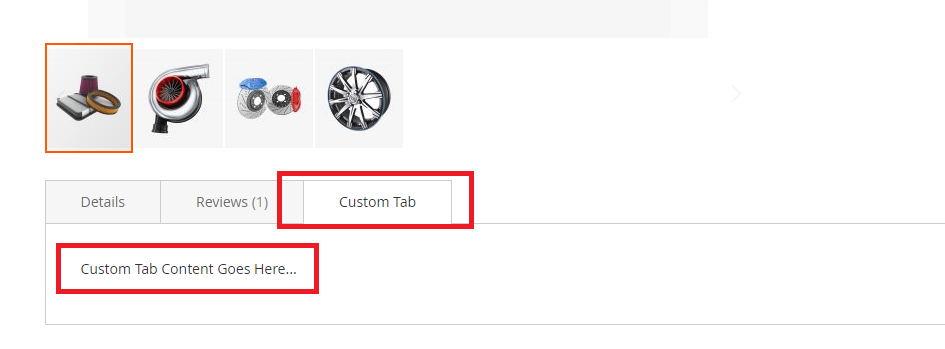
If you want to display product details in this file then you can simply get product data by:
$_product = $block->getProduct();

$productId = $_product->getId();
$productName = $_product->getName();
Thats it.

Write an article about ecommerce that help people to grow their ecommerce business. You’ll find best ecommerce guide, news, tips & more!


Leave a Reply