

In this post I am going to explain how to add product attribute programmatically in magento 2.
We are going to create three custom product attributes. Yes/No, Select Option and Text field.
We need to create the data setup script(InstallData.php) with parameters of the new attribute.
File path: app/code/Ht/Mymodule/Setup/InstallData.php
<?php

namespace Ht\Mymodule\Setup;

use Magento\Eav\Setup\EavSetup;
use Magento\Eav\Setup\EavSetupFactory;
use Magento\Framework\Setup\InstallDataInterface;
use Magento\Framework\Setup\ModuleContextInterface;
use Magento\Framework\Setup\ModuleDataSetupInterface;

class InstallData implements InstallDataInterface
{
    private $eavSetupFactory;

    public function __construct(EavSetupFactory $eavSetupFactory)
    {
        $this->eavSetupFactory = $eavSetupFactory;
    }

    public function install(ModuleDataSetupInterface $setup, ModuleContextInterface $context)
    {
        $eavSetup = $this->eavSetupFactory->create(['setup' => $setup]);

        $eavSetup->removeAttribute(\Magento\Catalog\Model\Product::ENTITY, 'custom_yes_no');
        $eavSetup->addAttribute(\Magento\Catalog\Model\Product::ENTITY, 'custom_yes_no', [
            'group' => 'Product Details',
            'type' => 'int',
            'sort_order' => 200,
            'backend' => '',
            'frontend' => '',
            'label' => 'Custom Yes/No',
            'input' => 'boolean',
            'class' => '',
            'source' => 'Magento\Eav\Model\Entity\Attribute\Source\Boolean',
            'global' => \Magento\Catalog\Model\ResourceModel\Eav\Attribute::SCOPE_GLOBAL,
            'visible' => true,
            'required' => false,
            'user_defined' => false,
            'default' => '',
            'searchable' => false,
            'filterable' => false,
            'comparable' => false,
            'visible_on_front' => false,
            'used_in_product_listing' => true,
            'unique' => false,
            'apply_to' => ''
        ]);

        $eavSetup->removeAttribute(\Magento\Catalog\Model\Product::ENTITY, 'custom_dropdown');
        $eavSetup->addAttribute(\Magento\Catalog\Model\Product::ENTITY, 'custom_dropdown', [
            'group' => 'Product Details',
            'type' => 'int',
            'backend' => '',
            'frontend' => '',
            'sort_order' => 210,
            'label' => 'Custom Dropdown',
            'input' => 'select',
            'class' => '',
            'source' => 'Ht\Mymodule\Model\Source\Customdropdown',
            'global' => \Magento\Eav\Model\Entity\Attribute\ScopedAttributeInterface::SCOPE_GLOBAL,
            'visible' => true,
            'required' => false,
            'user_defined' => false,
            'default' => '',
            'searchable' => false,
            'filterable' => false,
            'comparable' => false,
            'visible_on_front' => false,
            'used_in_product_listing' => true,
            'apply_to' => ''
        ]);

        $eavSetup->removeAttribute(\Magento\Catalog\Model\Product::ENTITY, 'custom_text_field');
        $eavSetup->addAttribute(\Magento\Catalog\Model\Product::ENTITY, 'custom_text_field', [
            'group' => 'Product Details',
            'type' => 'varchar',
            'backend' => '',
            'frontend' => '',
            'sort_order' => 220,
            'label' => 'Custom Text Field',
            'input' => 'text',
            'class' => '',
            'global' => \Magento\Eav\Model\Entity\Attribute\ScopedAttributeInterface::SCOPE_GLOBAL,
            'visible' => true,
            'required' => false,
            'user_defined' => false,
            'default' => '',
            'searchable' => false,
            'filterable' => false,
            'comparable' => false,
            'unique' => false,
            'visible_on_front' => false,
            'used_in_product_listing' => true,
            'apply_to' => ''
        ]);
    }
}
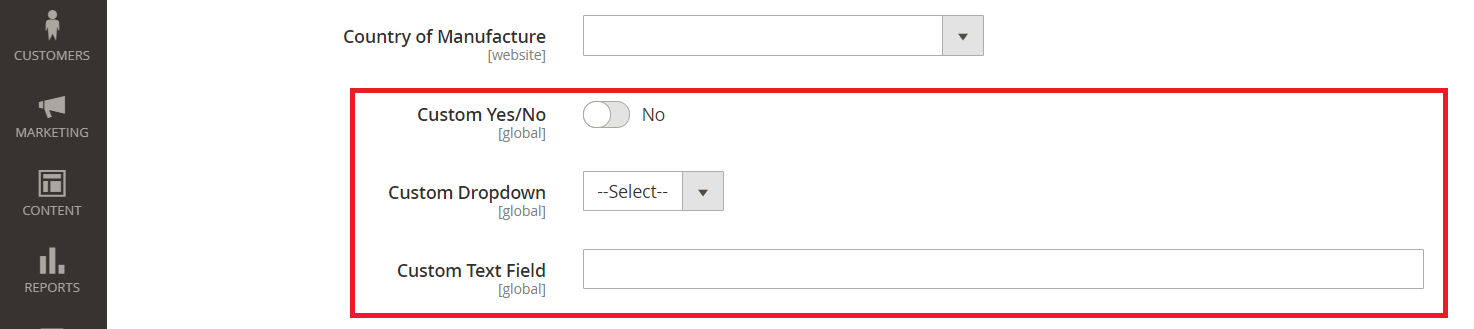
We have created the three custom product attributes.
Custom Text Field -> Text Box
Custom Yes/No -> Yes/No Field
Custom Dropdown -> Select Box
“Custom Dropdown” is a select box and we have defined a custom source: Ht\Mymodule\Model\Source\Customdropdown
So, we need to create the source file as well.
File path: app/code/Ht/Mymodule/Model/Source/Customdropdown.php
<?php

namespace Ht\Mymodule\Model\Source;

class Customdropdown extends \Magento\Eav\Model\Entity\Attribute\Source\AbstractSource
{
    public function getAllOptions() {
        if ($this->_options === null) {
            $this->_options = [
                ['label' => __('--Select--'), 'value' => ''],
                ['label' => __('Option 1'), 'value' => 1],
                ['label' => __('Option 2'), 'value' => 2]
            ];
        }
        return $this->_options;
    }
}
At Final, Open terminal/SSH and navigate to Magento 2 setup root directory and run below commands.
php bin/magento setup:upgrade
php bin/magento setup:static-content:deploy -f

Write an article about ecommerce that help people to grow their ecommerce business. You’ll find best ecommerce guide, news, tips & more!


May 6, 2020 at 2:45 pm
Very well explained, Thanks for sharing such an amazing article.
November 26, 2020 at 4:41 pm
Thank for sharing!